


Every Mac running macOS 13 or later quietly builds a knowledge graph of its owner on disk: who they talk to, where they go, when they are busy and who their family is — with a confidence score next to each conclusion. Researchers at Eighth Rank have now mapped it. We checked their work and a viral Ukrainian post about it, looked at whether this is unique to Apple, and collected practical advice.
The study, “Anatomy of Apple’s Personal Knowledge Graph”, was published on 28 October 2026 by Dario Pasquini and Michał Bazyli of Eighth Rank (8rank.ai). On 7 November it reached Hacker News as “Every Mac comes with an (undocumented) family member classifier”. Apple has not commented publicly on the findings.
What the researchers found
Since macOS 13 (2022), two background processes, knowledgeconstructiond and intelligenceplatformd, have been running on every Mac. Apple’s own manual pages describe them in two sentences: they analyse content on the device to build a general-purpose knowledge graph, and other parts of the system can query it.
The data sits in ~/Library/IntelligencePlatform: 51 unencrypted SQLite databases, protected only by the Full Disk Access permission. The core file, graph.db, stores facts as subject–predicate–object triples across 181 entity classes (57 of them activities such as sleeping, commuting or dining) and 278 relation types, each with a confidence score.
According to the researchers, the graph draws on Contacts, faces in Photos, Calendar titles and attendees, Family Sharing (including every member’s age), the emergency contact in Medical ID, events and contacts that Siri Suggestions finds in Mail and Messages, a communication log (metadata only, no message text), location, Screen Time and installed apps. Relation PS571/PS572, for instance, holds latitude and longitude; PS407 holds phone numbers; PS29/PS30 hold start and end times.
How a Mac decides who is family
macOS ships two CoreML models built on XGBoost, EntityTagging_Family and EntityTagging_FamilyAndFriends. Each scores a person on 144 numeric features: 20 identity signals (shared surname or address, Family Sharing, age gap), 40 communication-timing signals and 84 photo signals — more than half of the input. One feature is named, quite literally, the probability that a person appears in your photos on a Saturday night.
Scores land in entityTagging.db: one row per person, 17 relationship columns (mother, father, partner, child, sibling, coworker and so on), recomputed daily. The researchers found shipped models behind only two of those columns and could not trace how the other fifteen are filled.
Deleted does not mean gone
A retracted fact moves to a second table, expired_stable_graph, keeping its sources and confidence. Internal markers suggest it is pruned after about 48 hours, but on their own Mac the researchers found “very old records” there. Conclusions can also outlive their evidence: two people the graph had dropped the day before were still scored.
Why it matters
In a follow-up thought experiment, the researchers gave an extracted graph to a modified open-weight language model and asked for an attack plan. It picked targets by relationship score (the owner’s mother at 0.96 confidence), timing from the calendar and trusted numbers from contacts, and drafted an extortion scenario.
A breach hands you records; this store hands you conclusions.
— Eighth Rank
This is not a remote vulnerability: an attacker must already run code on the Mac and hold Full Disk Access. But in Ukraine, where “Mum, I’m in trouble” phone scams are a daily occurrence, a ready-made list of relatives, their numbers and the owner’s schedule would make such calls far more convincing, especially combined with voice cloning. The graph also covers people who never bought an Apple device or agreed to anything.
What a viral post got right and wrong
A widely shared Ukrainian Facebook post retold the study accurately on the processes, file paths, numbers, relation codes, retention and the lack of an off switch. (The processes can be stopped only with System Integrity Protection disabled, which weakens the Mac far more than it helps.) Several claims, however, go beyond the evidence:
- “Health data”: the study names only the Medical ID emergency contact, not health records.
- PhotoAnalysisD: the study does not name it as the source of the relationship model; the family classifiers belong to IntelligencePlatform.
- “The exact same graph on iPhone”: a comparable store exists at
/private/var/mobile/Library/IntelligencePlatform, as forensic examiner Alexis Brignoni documented in iLEAPP in September 2026. Whether it is identical has not been established. - iCloud sync filling the Mac’s family scores: a plausible hypothesis from the post’s author, not something the researchers tested.
- A kindergarten call “at 17:35”: the author’s illustration, not a documented case.
The researchers themselves stress that parts of their analysis are inference rather than Apple documentation, and that the example graphs are synthetic.
How other platforms compare
- Windows Recall on Copilot+ PCs is opt-in and encrypts its data with keys held in a secure enclave behind Windows Hello. In 2026, researcher Alexander Hagenah still extracted its contents after unlock; Microsoft said this was consistent with the design.
- Samsung Galaxy phones since the S25 run a Personal Data Engine that builds a knowledge graph from Samsung apps, encrypted in Knox Vault. It can be switched off in the Personal Data Intelligence menu, which, Samsung says, deletes the analysed data.
- macOS builds its graph by default, with no switch, in plaintext databases guarded by a single permission.
iKnow: see your own file
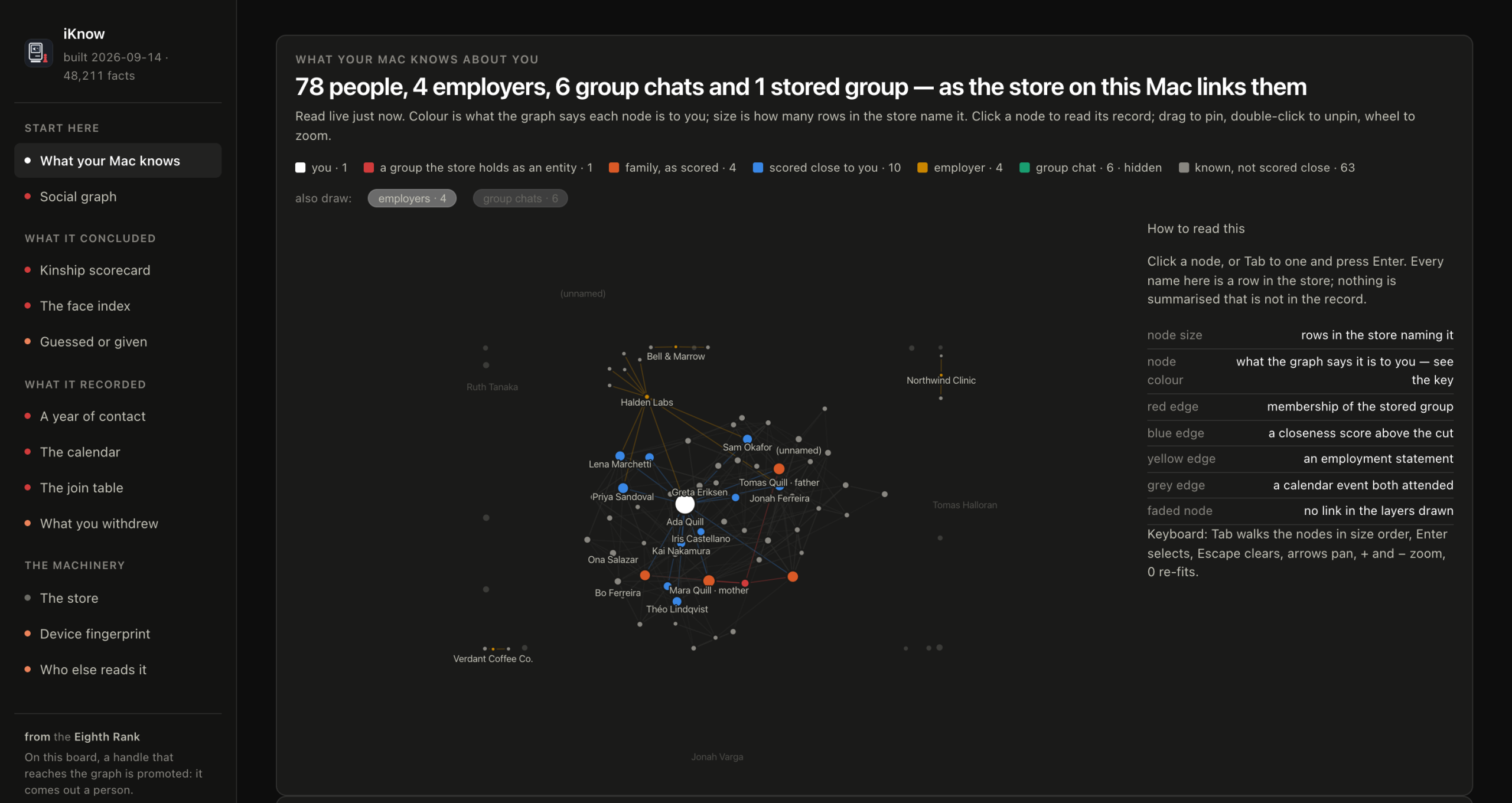
The researchers released iKnow, a small read-only web app that opens your Mac’s graph in a browser: people, relationship scores, messaging frequency, faces and places. A plain sqlite3 shell shows the same data.
- Platforms: macOS only; tested on 26.6.2, 26.7.1 and 27.0.1.
- Price: free, Apache 2.0 licence; needs only Python 3.
- Open source: yes, on GitHub.
- Security: binds to 127.0.0.1 only and stores or logs nothing. But the Terminal you launch it from needs Full Disk Access — the very permission an attacker would want — so revoke it afterwards. The authors say the code is entirely generated by a language model and may contain errors. The optional AI-agent mode sends your data to the model’s servers; avoid it.
What you can do
- Audit Full Disk Access (System Settings → Privacy & Security). Remove it from “cleaners”, “optimisers” and anything that does not need it: this permission decides whether other code can read the graph.
- Turn on FileVault. Disk encryption protects a stolen, powered-off laptop, though not a running Mac with malware.
- Feed it less. The viral post suggests keeping work calendars and mail in a browser rather than system apps, turning off Siri Suggestions for Mail and Messages, and using separate Apple IDs for a work Mac and a personal phone. The logic is sound, but nobody has measured how much this thins the graph.
- Do not disable SIP just to stop these processes.
- Agree on a family code word for emergency calls. It defeats “Mum, I’m in trouble” scams whatever your computer knows.
Main photo: MacBook Pro (14-inch, M5), AzureSaturn / Wikimedia Commons, CC0. iKnow screenshot: 8rank / GitHub, Apache 2.0.
